Best AI vector converters — 2026 Ranked by output quality for production work.
The best AI vector converters in 2026 are Vectorizer.AI ($9.99–19.99/mo) for clean photographic-source output, vector.ai ($9/mo) for stylized illustration vectorization, Adobe Firefly Vector for Creative Cloud users, and Recraft for AI-generated vector art. All produce noticeably cleaner geometry than path-finding auto-tracers like Adobe's Image Trace, but none replace a hand rebuild for production output that goes to vinyl plotters, embroidery digitizers, screen-print presses, or CNC tables.

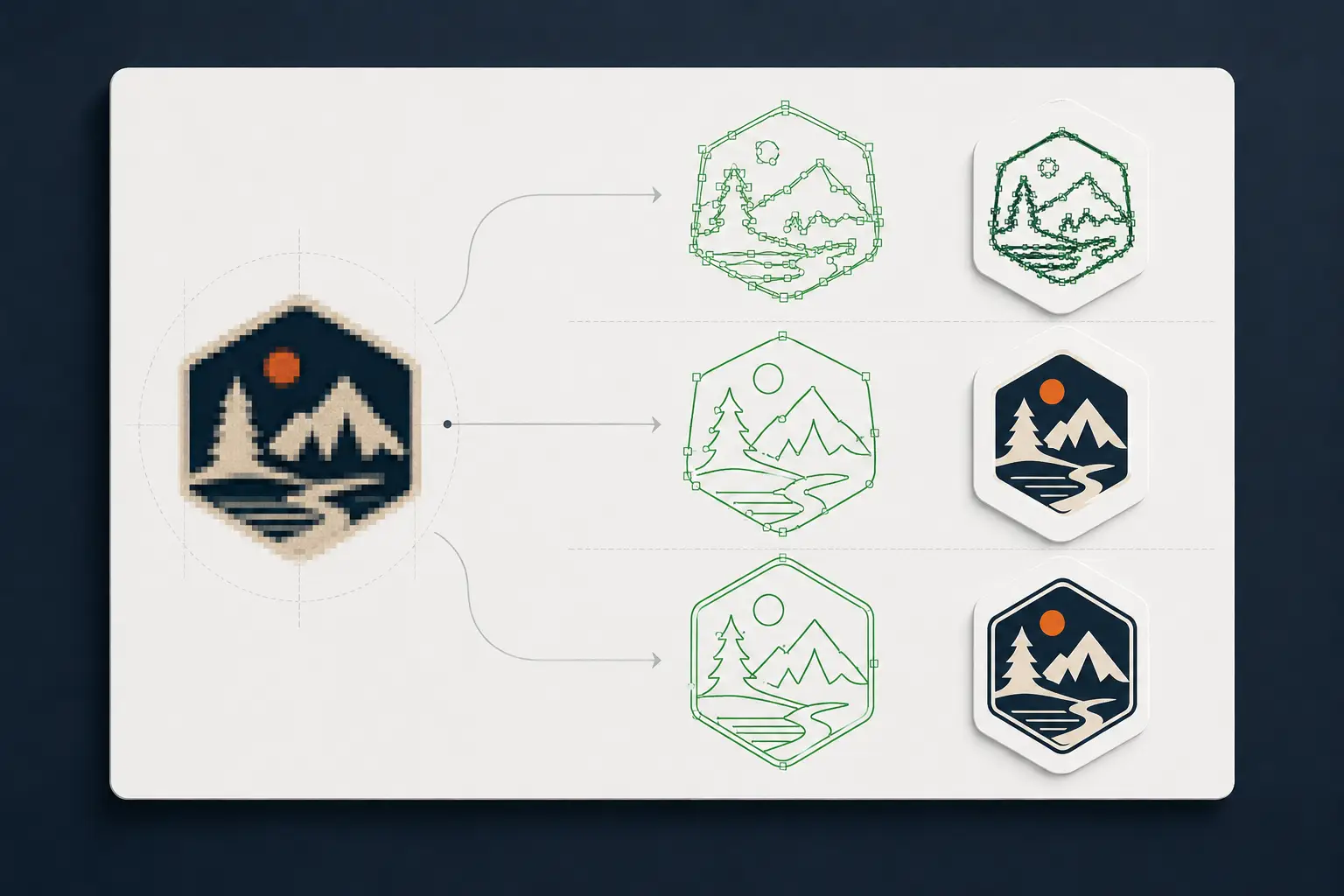
What changed: AI vs algorithmic auto-trace
Path-finding auto-tracers (Image Trace, PowerTRACE, Inkscape Trace Bitmap) work by scanning pixels and laying down paths along brightness boundaries. The output is geometrically faithful but contains hundreds of redundant nodes, sub-pixel jitter, and open contours where the source had noise.
AI-trained vectorizers — released starting around 2022, mature by 2024 — work by training neural networks on millions of (raster, vector) pairs. The output looks more like what a designer would actually draw: smoother curves, fewer redundant nodes, better corner detection, more sensible color quantization. The leap is real.
The current tools
| Tool | Pricing | Best for | Output formats |
|---|---|---|---|
| Vectorizer.AI | Free tier (3/day) · $9.99/mo limited · $19.99/mo unlimited | Photographic source, logos with subtle gradients, stylistic vectorization | SVG, AI, PDF, EPS, DXF |
| vector.ai | $9/mo or $90/yr | Illustrative output, stylized vectorization, art-direction-heavy work | SVG, AI, EPS, PDF |
| Adobe Firefly Vector | Bundled with Creative Cloud | Designers already in the Adobe ecosystem; quick conversion-to-Illustrator handoff | AI (native), SVG |
| Recraft | Free tier · $12/mo Pro · $36/mo Pro+ | AI-generated vector art (text → vector), some raster-to-vector | SVG, PNG (vector-rendered) |
| Vector Magic | $7.95/mo or $295 desktop | Older tool but still useful for clean-source logos | SVG, AI, PDF, EPS |
Vectorizer.AI
Generally produces the cleanest output across the broadest range of input types. Strong on photographic source where pixel-finding tracers fall apart.
- Free tier: 3 conversions per day with watermark.
- Paid: $9.99/mo for 100 conversions, $19.99/mo unlimited.
- Output: SVG, AI, PDF, EPS, DXF — useful range.
- Strengths: photographic input, smooth curves, sensible corner handling, color quantization that matches the source.
- Weaknesses: occasional over-smoothing on sharp logos; needs cleanup for production color separation.
vector.ai
Tilts more illustrative — output has a stylized, designed feel rather than a strict trace. Great for converting photo source into vector illustration.
- $9/mo or $90/yr; no free tier beyond a small per-account credit.
- Output: SVG, AI, EPS, PDF.
- Strengths: illustration-style output, adjustable detail levels, nice handling of complex multi-color source.
- Weaknesses: not always faithful to the source (the stylization is a feature for art, a bug for logo conversion).
Adobe Firefly Vector
If you already pay for Creative Cloud, this is the easiest workflow — convert in Firefly, hand off to Illustrator with one click. Quality varies; newer tool, less mature than Vectorizer.AI.
- Bundled with Creative Cloud subscriptions ($22.99–59.99/mo).
- Output: native AI, SVG.
- Strengths: tightest Illustrator integration, no separate subscription.
- Weaknesses: generation-style output (less faithful to source than dedicated tracers); evolving, expect quality shifts.
Recraft
Different positioning — Recraft is primarily a text-to-vector AI image generator, with raster-to-vector as a secondary mode. Best for greenfield vector art rather than logo conversion.
- Free tier; Pro $12/mo; Pro+ $36/mo.
- Output: SVG, PNG.
- Strengths: AI-native vector art generation, brand-style consistency across multiple outputs.
- Weaknesses: trace mode is secondary; not the strongest pick if your input is an existing customer logo.
Tried the AI tools? When it has to cut, print, or stitch, get a human.
AI vectorizers give you a preview. A VectorWiz designer returns a production-correct file — minimal nodes, named colors, the format your machine runs. 24 hours.
Need something custom? Email hello@vectorwiz.com
Where AI vectorizers fit in a production workflow
AI vectorizers are tools, not solutions. Here's where each one fits and where the workflow still needs human work.
| Aspect | Production output | AI vectorizer fit |
|---|---|---|
| Web display / app icon | Good fit | Vectorizer.AI or Firefly; output is fine for web. |
| Single-color vinyl plotter | Marginal fit | Output needs cleanup pass; closed paths required for plotter. |
| Multi-color vinyl / large-format | Marginal fit | AI does geometry; color separation per layer is still manual. |
| Embroidery digitizing source | Poor fit | Stitch-friendly geometry isn't what AI produces; hand rebuild wins. |
| Screen-print spot color | Poor fit | Halftone separation per ink color isn't an AI strength. |
| DXF for CNC | Marginal fit | Closed-path validation and kerf compensation still manual. |
| Channel letter / signage | Poor fit | Fabrication-aware paths (returns, faces, kerf) need a designer. |
| Engraving (rotary) | Poor fit | Single-stroke font work isn't an AI vectorizer feature. |
How to pick — decision framework
- I'm a designer with photographic source
- Vectorizer.AI for faithful vectorization, vector.ai for stylized illustration output. Both at $9–20/mo.
- I'm a Creative Cloud subscriber
- Try Firefly Vector first — it's bundled and the workflow is fastest. Add Vectorizer.AI as a paid second tool if Firefly's output doesn't meet your needs.
- I'm generating vector art from text prompts
- Recraft. Pure text-to-vector is its sweet spot.
- I'm producing for vinyl, embroidery, screen print, or CNC
- AI vectorizers can scaffold the geometry, but the production prep — color separation, font outlining, layer structure, fabrication-spec paths — is still manual. Either bake that work into your designer's day, or outsource via VectorWiz hand rebuild. Pay-as-you-go starts at $19 per job (24h standard turnaround, 100% remake guarantee) — no subscription required, so it's a fair head-to-head against a $9–20/mo AI tool once you factor in the production prep the AI tool doesn't do.
- I run a production shop with high job volume
- Per-job pricing runs $19–$190 across four complexity tiers ($19 Simple / $57 Moderate / $114 Complex / $190 Production-grade), or the subscriber model ($399/mo Starter for 130 credits, $799/mo Pro for 380) drops the effective per-job cost for steady volume. Conversion happens in parallel with shop work, files come back production-correct, no cleanup pass.
Frequently asked questions
What's the best AI vector converter overall?
Vectorizer.AI generally produces the cleanest output across the broadest range of input types — photographic source, complex logos, stylized illustration. Pricing is $9.99–19.99/mo. For Creative Cloud subscribers, Adobe Firefly Vector is the most convenient option since it's bundled. For text-to-vector AI generation rather than raster-to-vector conversion, Recraft is purpose-built for that.
Is Vectorizer.AI better than Adobe's Image Trace?
Generally yes — Vectorizer.AI produces noticeably cleaner geometry, fewer redundant nodes, and better handling of photographic source. Image Trace is faster to access (already in Illustrator) and works fine for simple high-contrast logos. For anything more complex, Vectorizer.AI wins.
Can I use AI vectorizers for production output?
AI vectorizers produce great geometry but don't do the production-prep work — color separation per layer, font outlining, single-stroke for engraving, halftone seps for screen print, closed-path validation for CNC. For production output, AI scaffolds the path; a designer still does the rest. Or you skip the two-step and use a hand-rebuild service — VectorWiz starts at $19 per job with 24h standard turnaround and a 100% remake guarantee, no subscription required.
Free vs paid AI vectorizers — is the free tier enough?
For occasional use, yes — Vectorizer.AI's free tier (3/day with watermark) handles low-volume work. For paid, $9–20/mo is fair for the quality you get. The watermark on free tiers makes the output unusable for commercial work, but the conversions are real.
Which AI tool is best for converting photographs to vector?
Vectorizer.AI is consistently the strongest on photographic input — smooth curves, sensible color quantization, less over-smoothing than competitors. vector.ai produces a more stylized result that's preferred for illustration-style output. Adobe Firefly is newer and varies job-to-job.
How does AI vectorization compare to a hand rebuild for embroidery?
AI loses for embroidery. Embroidery digitizing wants stitch-friendly vector geometry — clean joins, no spurious nodes, single-line strokes where appropriate, kept-simple shapes that translate to thread. AI vectorizers produce path-faithful traces that don't optimize for the digitizing step downstream. Hand rebuilds tuned for embroidery beat AI tracers consistently.
Is Vector Magic still worth using in 2026?
Vector Magic is older (no AI training) but still produces decent output for clean-source logos. The desktop license ($295 one-time) was a fair deal pre-AI. Today, $9.99/mo Vectorizer.AI produces better output for less money. Vector Magic is worth using if you already own the desktop license.
Can AI vectorizers replace hand rebuilds entirely?
For non-production work — web display, social media graphics, design comps, stylistic illustration — yes. For production output where downstream tooling cares about path quality, color layering, and fabrication-aware geometry, no. AI vectorizers scaffold the geometry; a designer still does the production prep. For shops doing this daily, outsourcing the whole conversion to a hand-rebuild service is usually faster than the two-step.
Tanvir Chowdhury
Runs production operations at VectorWiz. Writes about file briefs, intake, and the production-side details shops learn the hard way.
Related articles
Drawn by hand. Built for production.
Hand-redrawn from $19, back in 24 hours. Upload for an instant price, no commitment.