Pixel vs vector graphics — the technical difference Same picture. Completely different math.
Pixel graphics (raster) store an image as a grid of coloured squares — each pixel is a tuple of (x, y, colour) values, fixed at the source resolution. This vector vs pixel comparison (searched either way round) comes down to one thing: math versus a grid. Vector graphics store an image as math — paths, points, curves, fills — recomputed at any output size. Pixels excel at photographic detail and lossless captures of real-world subjects; vectors excel at logos, icons, and production cut paths that need to scale.

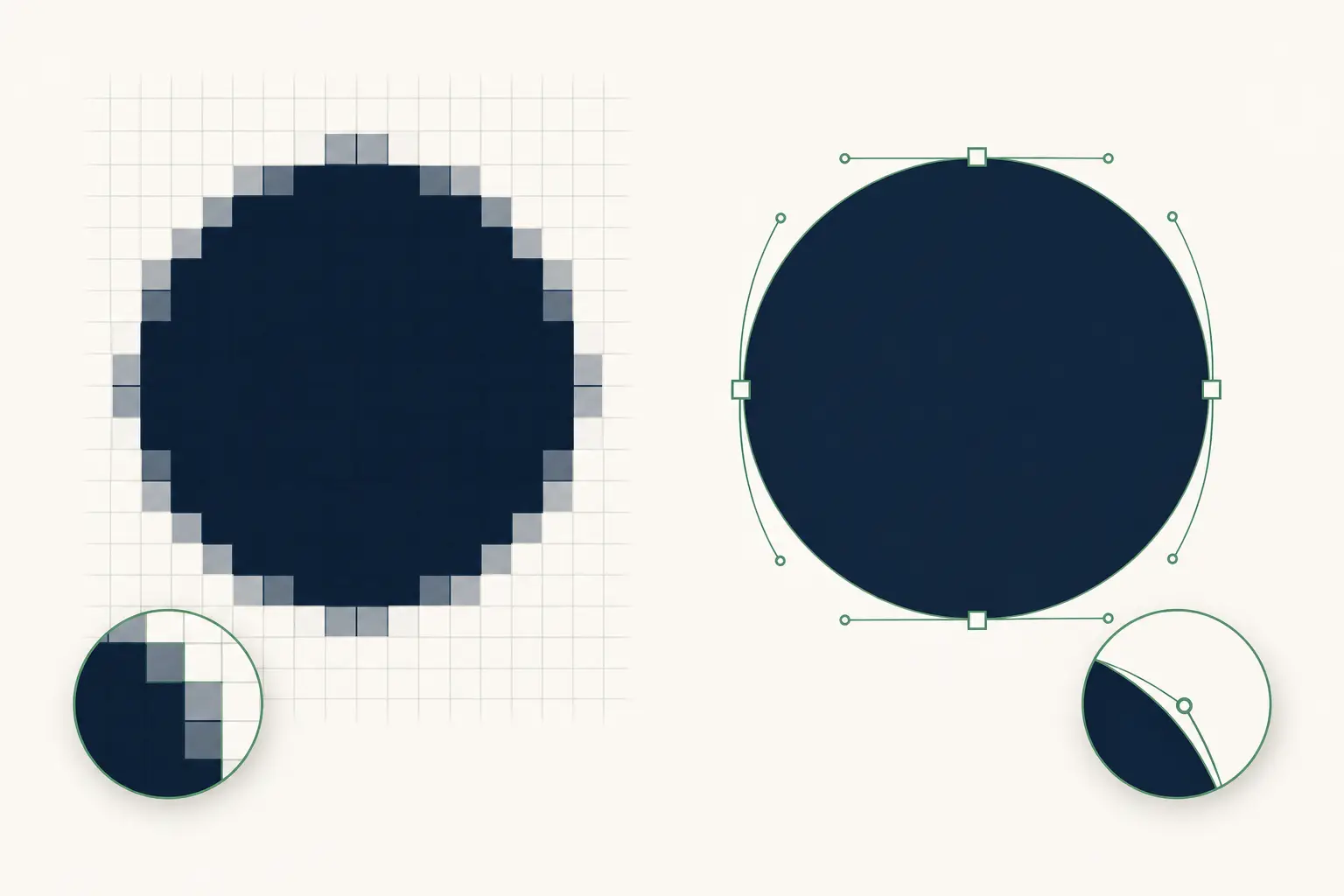
How pixel graphics store an image
A pixel image is literally a grid. A 1920×1080 image stores 2,073,600 individual pixels, each with a colour value (typically 24 bits — 8 bits each for red, green, blue) plus optional 8 bits of alpha. The image 'is’ the pixel data.
Stuck with a raster logo? See where auto-trace breaks — free.
Upload it to our in-browser tracer, then let a human rebuild it as a clean, scalable vector. Production-correct in 24 hours.
Need something custom? Email hello@vectorwiz.com
Compression (PNG, JPG, WebP) reduces the on-disk footprint but doesn’t change the underlying model — when you open the file, you still get a 1920×1080 grid of pixel values to work with. The image has a fixed resolution baked in at capture or creation time.
How vector graphics store an image
A vector image is a sequence of drawing instructions. A logo might be: 'start at (10, 10), draw a Bézier curve to (50, 80) with control points at (20, 30) and (40, 70), fill the resulting region with hex #00B74A.’
The file stores the instructions, not the image. When you open it, the renderer (browser, plotter, CNC) walks the instruction list and draws the result at whatever output size you ask for. The instructions don’t change; the rendering does.
The scaling math
Take a 200×200 pixel logo and ask the browser to display it at 2000×2000. There are 4,000,000 pixels to draw but only 40,000 in the source. The browser has to invent the other 3,960,000 via interpolation — usually bilinear or bicubic, which produces blurry edges. The actual information density of the image at 2000×2000 is still 200×200; you just stretched it.
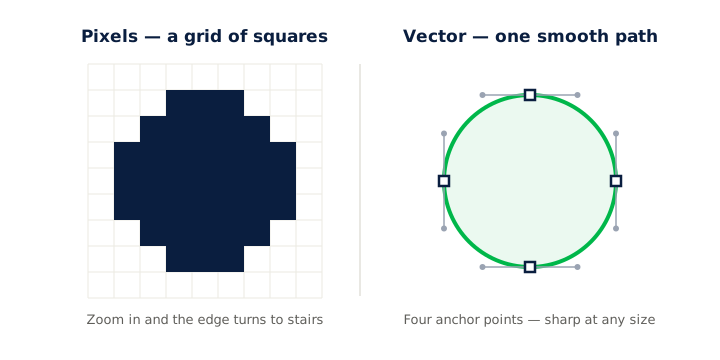
Take the same logo as vector and render at 2000×2000. The math is recomputed at the new resolution — each curve segment is evaluated to fit the 2000×2000 grid exactly. Edges stay crisp because the renderer is using the full output resolution from scratch.
| Output size | Pixel source (200×200) | Vector source |
|---|---|---|
| 100×100 | Sharp (downsampled) | Sharp |
| 200×200 | Sharp (1:1) | Sharp |
| 400×400 | Slightly blurry edges | Sharp |
| 800×800 | Noticeably blurry | Sharp |
| 2000×2000 | Severely blurry / blocky | Sharp |
| 10,000×10,000 | Effectively destroyed | Sharp |
File size and compute trade-offs
Pixel and vector formats trade space against time. Pixels are cheap to render (just blit the grid to screen) but expensive to store at high resolutions. Vectors are cheap to store but require computation at render time.
| Image | Pixel size (PNG) | Vector size (SVG) | Which wins |
|---|---|---|---|
| Simple logo (100 paths) | 200 KB at 2000×2000 | 5 KB | Vector (40× smaller) |
| Icon set (24 icons) | 2 MB total at 256×256 | 30 KB total | Vector (60× smaller) |
| Photo of a sunset | 2 MB at 1920×1080 | 50 MB to vectorise | Pixel (25× smaller) |
| Painterly portrait | 8 MB at 4000×4000 | Larger and worse quality | Pixel |
| UI mockup with text | 1.5 MB at 1920×1080 | 200 KB as SVG | Vector |
| Halftone-print photo | 5 MB at 4000×4000 | Vector preserves grain poorly | Pixel |
DPI, resolution, and why vector ignores both
DPI (dots per inch) is a pixel-format concept. It describes how many pixels per inch of output the file should occupy. A 1200×1200 image at 300 DPI prints at 4×4 inches; at 72 DPI it prints at ~16.7×16.7 inches but looks pixelated on print because there’s only 72 pixels per inch of detail.
Vector files have no DPI — the math renders at whatever pixel density the output device asks for. A vector logo prints at 300 DPI just as cleanly as at 72 DPI as at 4800 DPI (offset press). The pixel-vs-vector divide is also a DPI-vs-resolution-independent divide.
Anti-aliasing — the visible compromise
When a vector renders at a low output resolution, the curves get sampled onto a coarse pixel grid. The renderer uses anti-aliasing — partially-transparent pixels along edges — to make the curve look smooth. At higher output resolutions, the anti-aliasing footprint shrinks and the edge looks sharper.
Pixel images already have anti-aliasing 'baked in’ at source resolution. When you upscale them, the baked anti-aliasing pixels grow proportionally and become visible as fuzzy edges. There’s no way to add more anti-aliasing to a pixel image without redrawing — the source resolution is a hard ceiling.
When each wins — by content type
- Photographic content
- Pixel always. Vector can’t represent the millions of subtle tone variations a camera captures. Even AI vectorizers produce stylised interpretations, not faithful photo reproduction.
- Logos and brand marks
- Vector always. They need to scale from favicon to billboard without re-mastering.
- Icons and UI graphics
- Vector. SVG icon sets render crisp at every screen DPI; pixel icons need multiple resolution variants (1×, 2×, 3×).
- Production cut paths (vinyl, CNC, laser)
- Vector. The cutting tool needs path geometry, not pixel data.
- Embroidery digitizing source
- Vector. Stitch-friendly geometry comes from clean vector paths.
- Screenshots and screen captures
- Pixel. The source is pixel-native (your screen).
- Mixed photo + type (magazine ads, posters)
- Both. Pixel for the photo, vector for type and graphic elements. Combined in a PDF/X-4 for print or a layered PSD/AI for editing.
Frequently asked questions
Is a digital photo pixel or vector?
Pixel (raster). All digital cameras capture light onto a pixel sensor, so every digital photo is fundamentally a pixel image. Saved as JPG, PNG, HEIC, or RAW — all are pixel formats. You can convert a photo to vector via AI tools, but the result is a stylised interpretation rather than a faithful copy.
Why don’t computers use vector graphics for everything?
Computational cost. Rendering vector is more compute-intensive than blitting pixels — the GPU has to evaluate curve math at the output resolution. For photographic content, vector representation also balloons the file size and loses quality, so pixel wins on both counts. Vector wins for shape-heavy content (logos, icons, illustrations); pixel wins for tone-heavy content (photos, painterly art).
How big does a pixel image need to be to print at large sizes?
Standard print quality is 300 DPI. A 24×36 inch poster at 300 DPI needs a 7200×10800 source — about 78 megapixels uncompressed. Most consumer cameras max out around 24–48 megapixels, which means upscaling for large prints. Vector source skips this problem entirely.
Can I tell pixel from vector by looking at the file extension?
Mostly — but PDF is a notorious exception. JPG, PNG, WebP, GIF, TIFF, HEIC, PSD are always pixel. SVG, AI, EPS, DXF are always vector. PDF can be either. CDR (CorelDRAW) is vector. The reliable test is opening in Illustrator or Inkscape and seeing if individual elements are selectable as paths.
Are SVG and vector synonyms?
Not quite. SVG (Scalable Vector Graphics) is one specific vector file format — the W3C web standard. Vector graphics is the broader concept of representing images mathematically, which is implemented in many formats (SVG, AI, EPS, PDF, DXF, etc.). Every SVG is vector; not every vector format is SVG.
Do vector files have a resolution?
No — that’s the point. A vector file describes shapes mathematically without committing to a pixel grid. The resolution is decided at render time by whatever output device or context renders the file. A vector logo can render at 100×100 or 100,000×100,000 from the same source.
What’s the 'Bézier’ in 'Bézier curve’?
Pierre Bézier was a French engineer at Renault who published the curve math in 1962 for car-body design. Paul de Casteljau derived equivalent math at Citroën in 1959 but Renault published first, hence the name. Every modern vector editor (Illustrator, Inkscape, Figma) uses Bézier curves under the hood. Most users never need to think about the math, but the term shows up in tool tooltips.
If I take a vector logo and save it as a PNG, do I still have a vector?
No. PNG is a pixel format — saving vector to PNG rasterises it at a fixed resolution, losing the original math. The vector source still exists in your AI/SVG file, but the PNG export is a snapshot at that resolution. Keep both: vector for editing and any future scaling, pixel for the immediate display purpose.
Naimur Rahman
Leads design direction and quality at VectorWiz. Reviews and redraws production artwork by hand across sign, screen-print, embroidery, and CNC work.
Related articles
Drawn by hand. Built for production.
Instant pricing, no commitment. Production-correct vectors in your inbox in 24.