CNC File Preparation: How Poor Source Files Increase Material Waste and Rework Costs

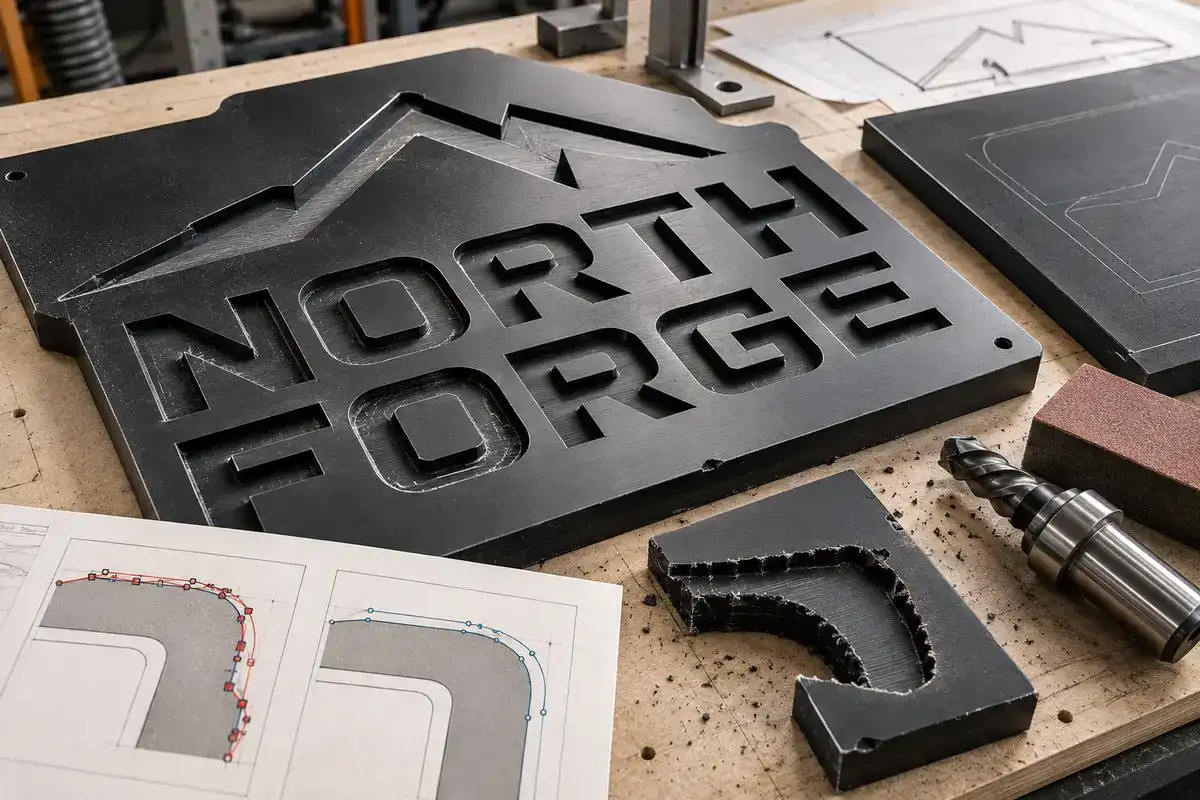
Sujan Bhuiyan, founder of VectorWiz, describes how the company began. He once sent a complex monument sign to an auto trace service, then spent three hours fixing the file that came back. The next time, he drew it from scratch in 90 minutes. That gap explains the whole problem. A CNC machine cuts exactly what the file tells it to. Open paths, doubled lines, messy curves, and wrong sizes all turn into scrap and second runs. CNC file preparation means catching those problems on screen, before they reach your material.
Is your next customer file ready to cut?
Upload the file with your machine, material, and kerf. A designer closes the paths, removes doubled lines, and sets real dimensions.
Need something custom? Email hello@vectorwiz.com
What is CNC file preparation?
It is getting a vector ready for the machine that will cut it. A laser, router, plasma table, or waterjet workflow turns the geometry in the file into the toolpath the machine follows, so mistakes in the file carry into the cut. A cut ready file has closed shapes, one line per edge, real dimensions, text converted to outlines, and cut, score, and engrave work on separate layers.
Parts that must fit together also need kerf compensation, which allows for the width of material the bit or beam removes.
Which file problems cause the most CNC material waste?
Six file problems are common sources of CNC material waste that starts at the design stage.
Open paths
When a shape does not close, the CAM software cannot tell the inside from the outside, so it may refuse to build a toolpath or cut the part with a gap. On plasma, the pierce that starts a cut leaves a small divot, so CAM software adds a lead in to keep it off the finished edge. For holes, The Fabricator recommends starting the lead in near the center, so the divot lands in the metal being cut away. Many CAM programs cannot offset an open line, so a lead in cannot be placed at all.
Duplicate lines
Tracing a picture of a line draws around both edges of it, so one line becomes two. One LightBurn user found a job set to 6 passes running 12 on some lines because of it. LightBurn's Delete Duplicates tool only removes lines that match exactly, so these near copies usually slip through.
Too many nodes
A circle drawn in Illustrator has four anchor points. An auto traced circle is often dozens of short segments, which turns one curve into many tiny moves. On many machines, very short moves keep the cutter from reaching its programmed feed rate, and the curve can come out slow and visibly faceted. Vectric's documentation describes its Fit Curves to Vectors tool as a way to replace those segments with arcs or Bezier curves within a set tolerance.
Wrong size
A screenshot or web logo is measured in pixels, not inches. Unit mixups cost just as much: a part drawn in millimeters but read as inches comes out 25.4 times too large.
Letters that lose their centers
Cut an O straight through and the middle falls out. The same happens with A, B, D, P, Q, and R. Keeping them means adding small bridges or cutting the centers separately.
Details smaller than the bit
A round router bit cannot cut a sharp inside corner. It leaves a curve equal to its radius, so a 1/4 inch bit leaves a 1/8 inch radius. Fine serifs need a smaller bit, a laser, or a redraw that suits the tool.
Why does a bad file hurt more than the scrap?
The sheet is easy to replace. The hard part is the moment the operator lifts a finished letter off the bed and sees the gap, or watches the laser run the same outline a second time. Now a customer promised Friday needs a phone call, and the machine meant for the next job is running this one again. Anyone who has made that call knows the scrap was the smallest part of the bad day.
How do you work out CNC rework costs for one bad file?
Add the scrapped sheet, machine time for the failed run at your shop rate, operator time spent finding the problem, designer time spent fixing the file, the cost of cutting it again, and any rush shipping to keep the delivery date. The sheet is only the visible part, so CNC rework costs can run much higher than the scrap bin shows.
How does a traced file compare to a prepared file?
| What to check | Auto traced file | Prepared file |
|---|---|---|
| Shapes | Some open, toolpath may fail | Every path closed |
| Outlines | Doubled, may cut twice | One path per edge |
| Curves | Many short segments, slow cut | Few clean nodes, smooth arcs |
| Letter centers | May fall out | Bridged or cut separately |
| Size | Guessed from pixels | Real dimensions in set units |
| Kerf | Not accounted for | Compensation matched to your workflow |
Is your next customer file ready to cut?
Upload the file with your machine, material, and kerf. A designer closes the paths, removes doubled lines, and sets real dimensions.
Need something custom? Email hello@vectorwiz.com
How can you check a file before it goes on the machine?
- In Illustrator, press Ctrl+Y (Cmd+Y on Mac) for Outline view. Doubled lines and hidden strokes become visible.
- Click a letter O with the Direct Selection tool. A simple O should have only a few anchor points. Dozens on a basic curve usually point to a rough trace.
- Select all text and run Type, then Create Outlines, so fonts cannot swap on the shop computer.
- Check the document units, then measure one known size against the job spec.
- Run a test cut in the real material to confirm your kerf before cutting the full sheet.
These checks can catch many file related CNC cutting errors while they are still free to fix.
How do you fix a file that fails these checks?
In Illustrator, select two open ends and use Object, then Path, then Join (Ctrl+J) to close a gap. Object, then Path, then Simplify reduces extra anchor points. In LightBurn, turning on Remove overlapping lines in the Optimization Settings stops the laser from cutting duplicate lines twice, and the Preview window shows whether it worked.
That only helps when lines sit exactly on top of each other. The side by side outlines auto trace creates need to be redrawn as one path. When problems run through the whole design, redrawing is usually faster, as the monument sign showed.
How do you find the right kerf for your machine?
Draw a square of a known size, such as 25 mm, and cut it as an outside part with no offset applied, in the material you plan to use. Measure its width with calipers. The bit or beam removes material on both sides of the line, so the square comes out smaller than drawn, and that difference across the width equals one full kerf. Holes grow by the same amount. Confirm the value with a test slot before cutting parts that fit together, and repeat the test whenever the material, thickness, bit, or power settings change.
What should you ask customers to send?
The best source is the original AI, EPS, or PDF from whoever designed the logo. Failing that, ask for the sharpest large image available, not a screenshot. Also ask for the finished size, the material and thickness, and the machine it will be cut on.
How does VectorWiz prepare files for CNC?
Before export, VectorWiz runs path close scripts to confirm there are no open ends, tiny gaps, or duplicate nodes. Outer edges are offset outward and holes inward by your kerf, so share your machine and material when ordering. Cut, score, and engrave each get a named, color coded layer for LightBurn, and files are supplied for workflows such as LightBurn, RDWorks, Fusion 360, and other CAM applications. DXF can be exported as version R12, R14, 2010, or 2018, and each delivery includes a material and tool note sheet.
One example on the VectorWiz site is an acrylic panel sign for Ridgeline Hardware, drawn from a 600 dpi TIFF and delivered with three operation layers and kerf compensation inside the 24 hour standard.
Why does VectorWiz draw every CNC file by hand?
Because auto trace creates the problems described above. VectorWiz was founded in 2022, and its senior designers were hired from shop production backgrounds before joining. Every job is held to six standards: hand drawn with no vectorize filter, prepared for the specific workflow it is headed to, color matched to real standards, built with closed paths and clean nodes, layered and named, and backed by a 100 percent remake guarantee.
Pricing follows the work, not the file size. A simple single color wordmark usually fits Tier 1 at 19 dollars, while kerf compensated work moves a job higher, because workflow is one of the six factors a designer weighs. The price locks instantly when you upload, before billable work starts.
When is outsourcing CNC file prep not worth it?
A plain rectangle with a few holes is faster to draw in CAD, and a job due this afternoon will not fit even the Rush window. Outsourcing makes sense for logos, scans, photos, and lettering, where auto trace fails most.
Is your next customer file ready to cut?
The cheapest place to fix a bad file is on screen. Upload the file to the VectorWiz order page with your machine, material, and kerf. A designer closes the paths, removes doubled lines, sets real dimensions, and layers every operation. If the file does not cut correctly, VectorWiz redraws it for free. The guarantee covers the file, not material already cut, so a test cut on scrap is still worth doing on a new job. For batches or repeat parts, email hello@vectorwiz.com.
Frequently asked questions
What file format is best for CNC cutting?
DXF is widely used for routers and plasma tables, and SVG is common on desktop lasers. Ask for whatever your software imports.
Can a JPEG or PNG be used for a CNC job?
Yes. A designer redraws it by hand, though a damaged image can raise the tier.
Does VectorWiz prepare files for plasma and waterjet?
Yes. Files are prepared for lasers, routers, plasma tables, and waterjet, with layers and offsets matched to the machine.
Does DXF cost more than AI or SVG?
No. There is no upcharge for format conversion, including a Glowforge ready SVG.
What happens if the job changes after the price is locked?
If the scope grows after approval, VectorWiz sends a new quote instead of adding a surprise charge.
How long does CNC file prep take?
Standard turnaround is 24 hours, Rush is 12 for 50 percent more, and Flex is 3 business days for 10 percent less.
What if the file does not cut correctly?
VectorWiz redraws it free under its 100 percent remake guarantee, and revisions are included until the file is right.
Sujan Bhuiyan
Founder of VectorWiz. Writes about CNC file preparation and the shop-floor cost of source files that are not ready to cut.
Related articles
Is your next customer file ready to cut?
Upload the file with your machine, material, and kerf. A designer closes the paths, removes doubled lines, and sets real dimensions.