How to vectorize a logo from a photo. Logo from a photo — the camera recorded more than the logo.
To vectorize a logo from a photo, the logo has to be drawn again, not traced. A phone photo of a sign, truck, shirt or business card records the logo plus everything around it: the angle it was shot from, the curve of the lens, glare, shadows, fabric folds, the dot pattern of the print and the color of the light. An auto-tracer turns all of that into paths. A designer uses the photo as a reference, corrects for the angle, works out the shapes, colors and type, and rebuilds the logo as clean vector. The better the photo, the fewer questions that takes.

- Shoot it straight on
Stand square to the logo in even light, fill the frame by walking closer rather than zooming, and take several shots.
- Add a measurement
Lay a ruler in the frame or write down one real dimension, so the redraw comes back at the right proportions and size.
- Send every shot
Send the original photos, not screenshots, with notes on anything they can't show: worn letters, the font, the colors.
What a photo of a logo adds that isn't the logo
A design file contains the logo. A photo contains the logo as it looked to one camera, from one spot, in one light, on one surface. Most of what makes a photo hard to vectorize has nothing to do with resolution.
- Perspective. Unless the camera was exactly square to the surface, the logo is keystoned: the near side is bigger than the far side, circles turn into ovals and parallel lines lean toward each other. A sign shot from the sidewalk below it is the classic case.
- Lens curve. Phone cameras, the ultra-wide lens most of all, bow straight lines near the edges of the frame. A long wordmark across a truck box can come back with a slight smile or frown.
- Glare and reflections. Gloss paint, vinyl, laminate, glass and foil reflect the sky or the flash, and a hot spot wipes out whatever is under it.
- Shadows. Channel letters, a raised sign or an embroidered patch cast shadows that a tracer reads as part of the shape.
- Fabric. Folds, stretch and knit texture bend a shirt logo out of shape, and puff print, embroidery or rubber ink add bevels and highlights that the flat artwork never had.
- Print dots. A business card, flyer or catalog page under a phone camera shows the halftone dots that built its colors, and a tracer will turn each dot into a shape.
- Color cast. Indoor light turns white yellow, shade turns it blue, and the phone's own processing shifts it again. The color in a photo is the color of the light as much as the ink.
- Compression. The phone saves a JPG, then a messaging app compresses it again. Fine lines and small type are the first things lost.
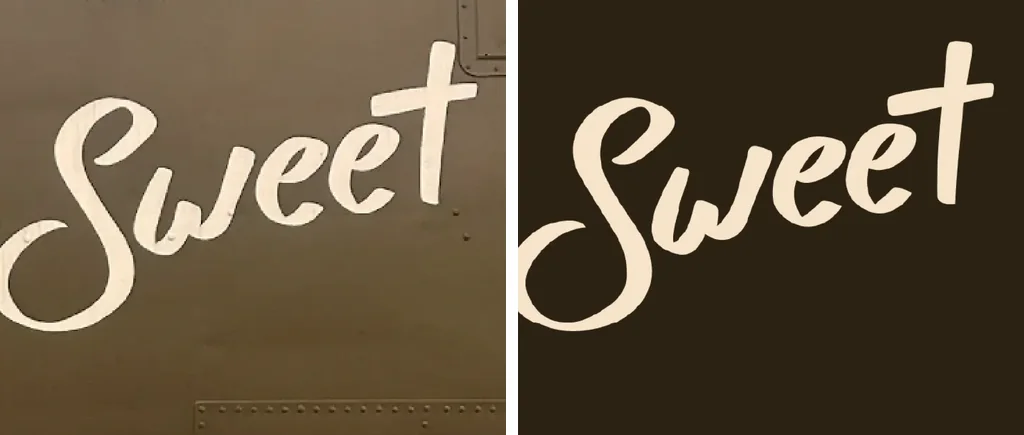
None of that is the logo. Working from a photo means separating the two: deciding which edges belong to the artwork and which belong to the surface, the camera or the light, and drawing only the first.
How to take a reference photo a designer can use
If you can still get to the sign, truck, shirt or card, a few minutes with a phone does more for the result than anything done to the file afterward.
- Stand straight on. Center yourself on the logo and hold the phone parallel to the surface. For a high sign, step back and shoot from as far away as you can rather than from directly underneath.
- Use even light. Overcast daylight or open shade beats direct sun. Turn the flash off for anything glossy, and move a step sideways if a reflection lands on the logo.
- Fill the frame, don't zoom. Walk closer instead of pinching in, because digital zoom only crops and enlarges. Use the main camera rather than the ultra-wide, and leave a margin so the logo is not on the bowed edge of the lens.
- Take several shots. One of the whole logo, then close-ups of the small type, the fine details and any worn areas. Several imperfect photos together often show what no single one does.
- Include a known dimension. Lay a ruler or tape measure along the logo, or note one real measurement such as the sign width or a letter height. It pins down the proportions and tells the designer what size the vector should be.
- Photograph the original, not a screen. A photo of a monitor or a phone adds a moiré pattern and the screen's own pixels. If the logo exists as a file somewhere, send the file instead.
- Flatten what you can. Lay a shirt flat and smooth it out, set a card on a table, and turn a mug so the logo faces you, with extra shots around the curve.
What can and can't be recovered from a photo
A photo is evidence, not a blueprint. Some things come back exactly, some take judgment, and some are simply not in the picture.
| What the photo shows | What a designer can do with it |
|---|---|
| Simple shapes, circles, straight edges | Redraw them exactly, corrected for the camera angle |
| Type in an identifiable font | Identify the font, set the text and match the spacing to the photo |
| Custom lettering or script | Redraw it letter by letter from the clearest shot |
| Worn, faded or peeling paint | Rebuild the shapes from the parts that survive, and ask where it is unclear |
| Letters lost under glare, a fold or a shadow | Work from another photo or ask you; never guess |
| Ink or paint color | Match what the photo shows, or use the PMS or CMYK values you supply |
| Detail smaller than the photo can resolve | Not recoverable from that photo; needs a closer shot or a description |
Fonts are often the easy part. Many logos use a commercial typeface, and a clear, square-on view of a few letters is often enough to identify it. Custom lettering, a modified font or a script has to be drawn, and the photo with the clearest view of the letters sets the shapes.
Where a photo genuinely does not show something, such as a letter under a hot spot or a word half peeled off an old truck door, the designer asks rather than guesses. A confident wrong guess gets printed on every shirt in the order. A question costs one reply.
Color is the other limit. A photo records the light as much as the ink, so colors taken from it are a close visual match, not a measured one. If the brand has PMS or CMYK values, or a printer has a physical sample to match, say so; Pantone color matching covers how those values are set in the file.
Send the photos. Get the logo back as real vector.
A designer draws it again by hand from your reference shots, with clean paths, real colors and set type, in 24 hours.
Need something custom? Email hello@vectorwiz.com
Doing it yourself: straighten the photo, then trace
With a simple logo and a decent photo, you can get somewhere on your own. The order matters: fix the geometry first, then make the paths.
1. Straighten the photo
Photoshop's Perspective Crop tool, GIMP's Perspective tool or a phone document-scanner app can pull a keystoned shape back to square. Drag the corners to something you know is rectangular in real life: the sign panel, the card edge, the truck door. If straight lines bow, run a lens correction first. Then check the result against your known dimension, because a correction that looks right can still be stretched in one direction.
2. Trace it, or draw over it
With the straightened photo as the bottom layer, Image Trace in Illustrator or Trace Bitmap in Inkscape will produce paths, and on a bold, flat, high-contrast logo that can be close enough for a quick vinyl cut. On a photo it also traces the glare, the shadows, the fabric texture and the print dots, so expect to delete and redraw a lot. Drawing over the photo with the pen tool gives cleaner shapes than cleaning up a trace; the trade-off between the two is laid out in how to convert a JPG to vector.
3. Know when it's enough
A straightened trace is fine for a one-off decal, a mockup or a reference print. It is not enough for a sign, a fleet, embroidery or anything where crooked letters and lumpy curves will be seen up close, or for a file that will be reused for years. If you find yourself redrawing most of the trace anyway, that is the point to hand it over.
What to send, and what you get back
Before treating a photo as the only source, make sure a real file doesn't exist; the sign shop, printer or embroiderer who made the item may still have the art, and how to find a vector version of a logo covers where to look. And if what you have is a small, blurry file rather than a photo, that is a different problem with different fixes, covered in how to fix a pixelated logo.
- Every photo you took, at full size. Upload or email the originals rather than screenshots or messaging-app copies, which have been compressed again.
- One real measurement, or the size the logo needs to be.
- The font name, if anyone knows it, and any text that must read exactly, such as a phone number or a web address.
- Colors: PMS or CMYK values if the brand has them, or a note on which photo shows the color best.
- Anything in the photo that is not part of the logo and could be mistaken for it, such as a sticker, a bolt, a seam or a crease.
What comes back is the logo itself, flat and square, without the surface it was photographed on: clean closed paths, solid fills in real colors, and type set or redrawn, at the proportions your measurement gives. Files are AI, EPS, SVG and PDF, ready for print, signs, garments, vinyl, engraving or an embroidery digitizer. The photo is used only as a reference. VectorWiz doesn't edit, retouch or color-correct the photo itself; the logo is drawn again.
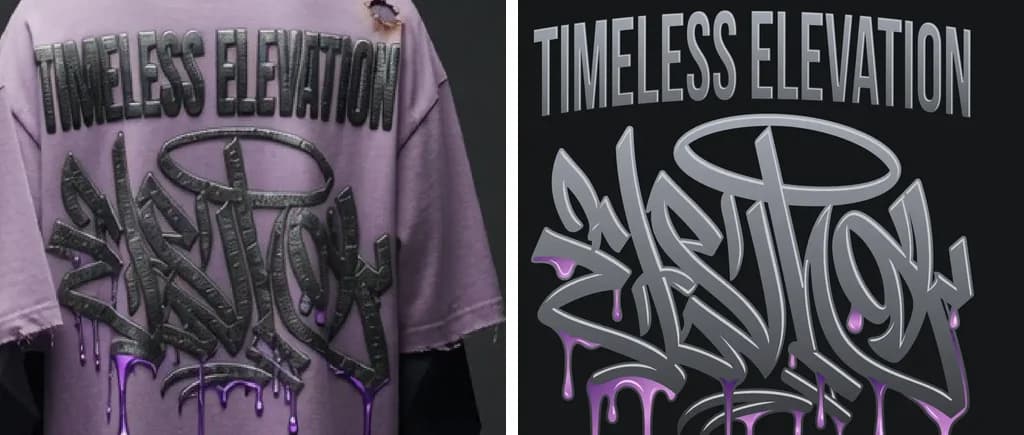
The image at the top of this page is a real job. The customer's source showed the design on the back of a shirt on a mannequin, with creases, a torn shoulder and the raised texture of the print. On the right is the vector drawn from it: the same letters and drips as flat shapes, without the fabric. If your only copy of a logo is a photo, you can send the photos and get it back the same way.
Frequently asked questions
Can I vectorize a logo from a photo with an auto-tracer?
You can run one, but it traces everything in the picture: glare, shadows, fabric texture, print dots and the camera angle. On a bold, flat logo shot straight on, the result can be cleaned up. On most photos, the cleanup takes longer than drawing the logo over the photo by hand.
How do I take a good photo of a logo for vectorizing?
Stand square to it, use even daylight with the flash off, walk closer instead of zooming, keep the logo away from the edges of the frame, and take several shots plus close-ups of the small parts. Lay a ruler in the frame or write down one real measurement.
Can you recreate a logo from a photo of a sign?
Yes, if the photo shows the shapes clearly. The designer corrects for the angle the sign was shot from and redraws it as flat vector. A sign photographed from directly below, at night or with sun glare on it is harder; a second shot from farther back and straight on often solves it.
What if part of the logo is worn off or hidden in the photo?
The designer rebuilds what the photo shows and asks about anything it doesn't, rather than guessing. Another photo, an old business card, a written description or the font name can fill the gap.
Can a font be identified from a photo of a logo?
Often, if a few letters are clear and shot fairly straight on. A common typeface can be matched and set as real type. Custom lettering, scripts and modified fonts are redrawn letter by letter instead.
Can VectorWiz turn a picture of a logo into vector?
We redraw it. A designer uses your photos as the reference and draws the logo again by hand as clean vector paths, with real colors and type set or redrawn. You get AI, EPS, SVG and PDF, priced by complexity from $19, in 24 hours standard. We don't edit, retouch or color-correct the photo itself.
Naimur Rahman
Leads design direction and quality at VectorWiz. Reviews and redraws production artwork by hand across sign, wrap, screen-print, and CNC work.
Related articles
Drawn by hand. Built for production.
Instant pricing, no commitment. Production-correct vectors in your inbox in 24.