Illuminated sign vector files: what glows and what doesn't.
An illuminated or lightbox sign file needs clean closed vector paths at full scale, fonts outlined, with the translucent (lit) areas and opaque (blockout) areas separated onto named layers. A backlit face is built straight from those paths — where light passes and where it is blocked is defined by the artwork — so the lit-versus-blocked intent must be explicit in the file, not guessed at fabrication.

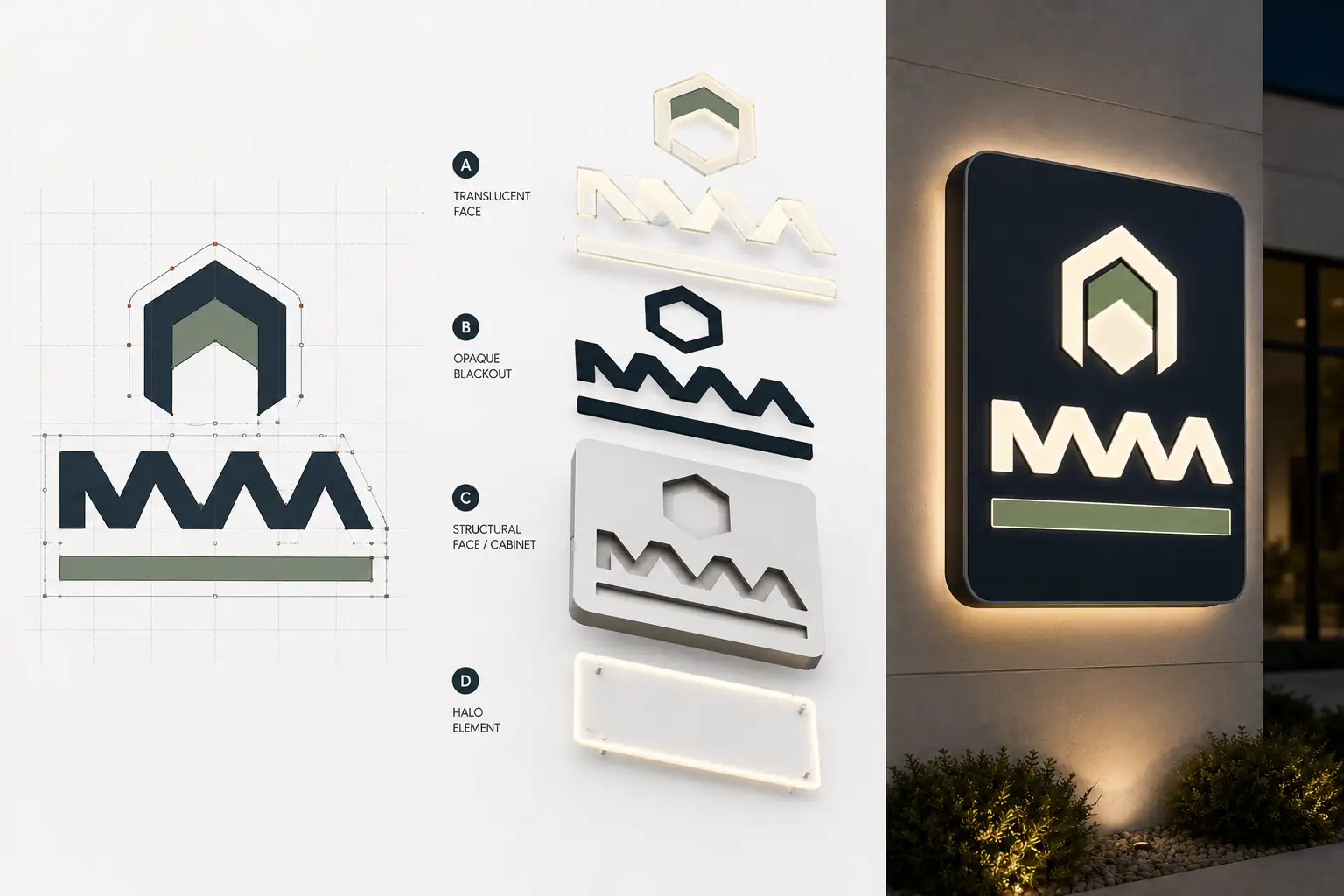
An illuminated sign has a second life at night, and the file decides what that looks like. Get the lit and blocked areas separated cleanly and it glows exactly where it should; leave it ambiguous and the fabricator is guessing what should shine. Here is how to build a backlit or lightbox sign file.
Separate what glows from what blocks
The core of an illuminated sign file is the split between translucent and opaque. Put the copy and graphics that should glow on one named layer, and the background or blockout that should stay dark on another. The face is built by applying translucent media or routing to those areas, so the artwork has to state clearly which is which — an ambiguous single layer forces a judgment call at the bench.
Closed paths, outlined, at full scale
As with any fabricated sign, every element is a clean closed path built at the sign's real size with type converted to outlines. An illuminated face is unforgiving because backlighting exposes ragged edges and stray nodes when it is lit. A raster or auto-traced logo should be rebuilt as clean vector first — the same discipline behind any production sign file.
Halo-lit and channel builds
For halo-lit (reverse channel) letters that glow around their edges, the file is clean closed letter paths with faces and returns on separate layers, built for reverse illumination. If the sign is a lit channel-letter build, the same face/return layering applies — the illumination method changes the fabrication, not the demand for clean, closed, layered vector.
Send the design. Get a lit-and-blockout file back.
Closed paths at full scale, fonts outlined, translucent and opaque areas separated for backlit or halo-lit builds. In 24 hours.
Need something custom? Email hello@vectorwiz.com
Frequently asked questions
What does an illuminated or lightbox sign file need?
Clean closed vector paths at full scale, fonts outlined, with the translucent (lit) areas and the opaque (blockout) areas clearly separated onto named layers. A backlit face is built from those paths — where light passes and where it is blocked is defined by the artwork, so the separation has to be explicit in the file.
How do you set up art for a backlit face?
Decide what glows and what stays dark, then build those as separate elements: translucent copy and graphics on one layer, opaque background or blockout on another. The printer or fabricator applies translucent vinyl or routes the face accordingly, so the file has to make the lit-versus-blocked intent unambiguous.
What about halo-lit (reverse channel) letters?
Halo-lit letters glow around their edges against the wall, so the file is clean closed letter paths, fonts outlined, at fabrication scale — similar to standard channel letters but built for reverse illumination. The faces and returns go on separate named layers so the fabricator forms them for a back-lit halo.
Do illuminated signs need full-scale vector like other signs?
Yes. Build at the sign's real size with type outlined so nothing is scaled or guessed at fabrication, and so the lit and blockout areas register exactly. A raster or auto-traced logo should be rebuilt as clean vector first — an illuminated sign shows every flaw when it is lit.
Can VectorWiz prep illuminated sign artwork?
Yes. We redraw the art as clean closed vector at full scale, fonts outlined, with translucent and opaque areas separated onto named layers for backlit or halo-lit builds. Standard turnaround 24 hours, Rush 12; send the sign spec.
Naimur Rahman
Leads design direction and quality at VectorWiz. Reviews and redraws production artwork by hand across sign, wrap, screen-print, and CNC work.
Related articles
Drawn by hand. Built for production.
Instant pricing, no commitment. Production-correct vectors in your inbox in 24.