Auto-trace vs clean vector: a node-count benchmark. How many nodes does auto-trace add? We counted, and published the files.
Auto-trace produced between 2.7 and 25 times the nodes of a clean vector in our October 2026 benchmark. Eight simple marks were drawn as vectors with the fewest nodes their shapes need, 155 nodes in all, then rendered as a clean 1000 px PNG and a 240 px JPEG. Potrace, the engine behind Inkscape's Trace Bitmap, returned 571 nodes from the PNGs and 422 from the JPEGs. ImageTracer, an open-source color tracer, returned 3,850 and 3,125, and drew up to 15.1% of one mark in the wrong color. Neither left open paths. All files are published under CC BY 4.0.

- Draw the reference
Eight marks built as vectors with the fewest nodes each shape needs: a circle is four nodes, a star ten.
- Make the rasters
Each mark saved as a clean 1000 px PNG and as a 240 px JPEG at quality 60, the size of a logo saved from an email.
- Trace and count
Both tracers ran at default settings, given the right number of colors. One script counted every node, path and color.
The result
Across the eight marks, the clean vectors needed 155 nodes. Every traced version needed more, on every mark, from both kinds of raster.
| Method | From a clean PNG | From an emailed JPEG |
|---|---|---|
| Reference vectors | 155 | 155 |
| Potrace 2.1.8 | 571 (3.7×) | 422 (2.7×) |
| ImageTracer 1.2.6 | 3,850 (24.8×) | 3,125 (20.2×) |
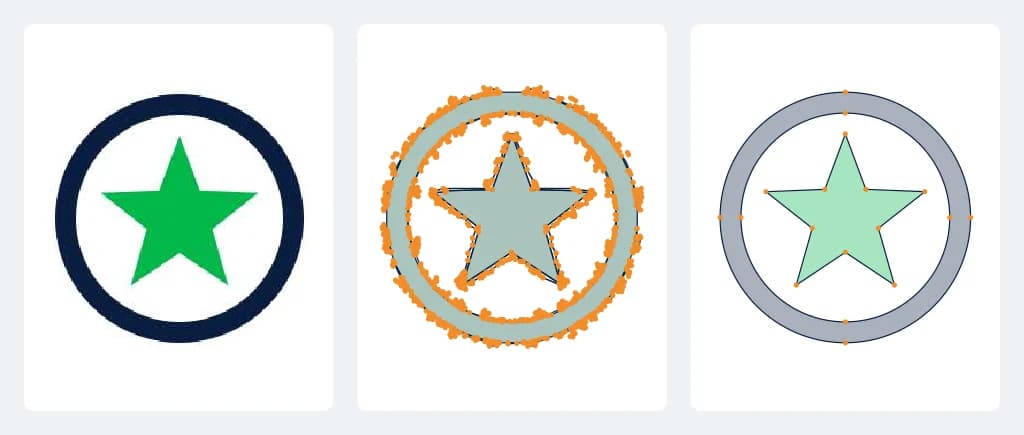
The picture at the top of this page is one row of that table: the badge as a 240 px JPEG, ImageTracer's version of it with every node marked (1,306), and the reference vector (18). The trace is the same shape drawn with more than seventy times the points.
Node counts, mark by mark
| Mark | Reference | Potrace PNG | Potrace JPEG | ImageTracer PNG | ImageTracer JPEG |
|---|---|---|---|---|---|
| Round badge with a star (2 inks) | 18 | 136 | 59 | 1,936 | 1,306 |
| Shield with a bar and a chevron (2 inks + white) | 15 | 39 | 42 | 68 | 59 |
| Mountain scene (4 inks + white) | 20 | 59 | 61 | 739 | 479 |
| Block-letter wordmark (1 ink) | 40 | 84 | 73 | 79 | 61 |
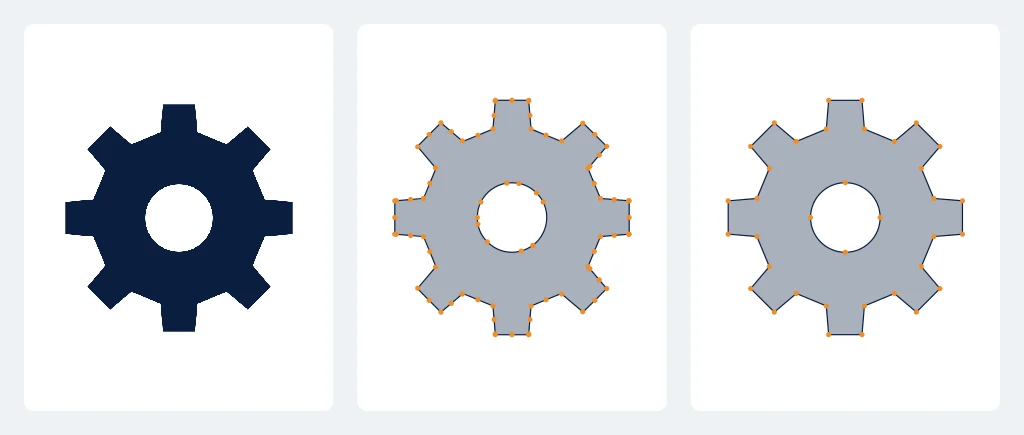
| Eight-tooth gear (1 ink) | 36 | 80 | 63 | 189 | 70 |
| Leaf with a vein (2 inks) | 6 | 39 | 56 | 439 | 317 |
| Three-ring target (3 inks) | 12 | 108 | 54 | 304 | 790 |
| Map pin (1 ink) | 8 | 26 | 14 | 96 | 43 |
Potrace came closest: between 1.8 and 9.3 times the reference, depending on the mark. It does best on straight-edged shapes such as the shield, the gear and the wordmark, and worst on curves: the leaf, the badge's two circles and the target's three rings, where a vector needs only a few nodes for each curve.
ImageTracer, which traces color regions rather than one ink at a time, used far more: up to 107.6 times the reference on the clean badge, where the soft edge pixels around the ring became hundreds of tiny shapes. A smaller JPEG sometimes gave fewer nodes than the clean PNG, because there were fewer edge pixels to follow, but more of the mark came out wrong.
Color and closed paths
Node count is not the only measure. Each trace was rendered and compared with the reference to find how much of the mark came out in a clearly different color.
- Potrace, given the exact inks, drew at most 2.3% of any mark in the wrong color.
- ImageTracer, told only how many colors to find, found one dark green for the mountain scene's navy, teal and green, and turned the orange sun pale grey. That put 15.1% of the mark in a clearly wrong color from the clean PNG, and 14.8% of the target from the JPEG.
- Neither tracer left an open path. Every outline closed, so in this test the problem with auto-trace is the node count and the color, not broken paths.
Both tracers were told the right number of colors, which a real user usually is not, and Potrace was handed the exact ink values. That makes these results a best case for auto-trace.
Why extra nodes matter in a production file
- Cutters, routers and lasers follow every node. More nodes means more tiny moves, and curves made of many short segments cut with a faceted, slightly lumpy edge.
- Editing gets slower. Moving a curve built from four nodes takes one drag; the same curve built from forty takes forty.
- Small mistakes hide in large counts. A stray node or a sliver between two colors is easy to see in a file of 18 nodes and easy to miss in a file of 1,300.
- Files get heavier. ImageTracer's badge from the clean PNG is more than 100 times the file size of the reference, which adds up when many go into one layout or RIP queue.
None of this means a trace is never good enough. For a bold, flat mark going on a screen, a Potrace result can be fine. For a sign, a decal, an engraving or a file that will be reused for years, the cleanup is where the time goes; why human vector conversion covers what a redraw does that a trace doesn't.
How the test was run
- Eight geometric marks with one to four inks, drawn as vectors in code with the fewest nodes each shape needs. They were not redrawn by a designer.
- Each mark rendered as a 1000 px wide PNG and as a 240 px wide JPEG at quality 60. The tracers were given the saved files, compression and all.
- ImageTracer 1.2.6 at default settings, given the true number of colors. Its white background shape was removed before counting, because a redraw has none.
- Potrace 2.1.8 at default settings, run once per ink on a mask of the pixels nearest that ink, the way Inkscape's multi-color trace works.
- A node is the start of each outline plus the end of each segment. One script counted every file, and the same script is published with the data.
- Wrong color: each trace and its reference rendered at 400 px; a pixel counts as wrong when its color is clearly different from the reference.
What this test does not show
- These are eight simple geometric marks, not customer logos. There is no live type and no fine detail, which is where tracers usually struggle most.
- Only two open-source tracers were tested. Illustrator Image Trace, Vector Magic and AI vectorizers were not.
- The reference is the floor, not a designer's measured result. A redraw works from the raster too, so it lands near the reference, not exactly on it.
- Each tracer ran once, at default settings. Tuned settings change the numbers, in both directions.
Our comparison pages carry a separate count on one 4-color production logo, with Vector Magic, Illustrator Image Trace and an AI vectorizer against a hand redraw: see VectorWiz vs Vector Magic.
Download the data
Everything is published under CC BY 4.0: the reference vectors, the 16 source images, the 32 traced SVGs, the results CSV and a README with the method and the commands to reproduce it. Download all of it as a zip, or open results.csv and the README. Credit "VectorWiz trace benchmark, October 2026".
Skip the cleanup. Get the logo redrawn as clean vector.
A designer draws it again by hand with the nodes it needs and the inks it uses, priced by complexity from $19, in 24 hours.
Need something custom? Email hello@vectorwiz.com
Frequently asked questions
How many more nodes does auto-trace create than a clean vector?
In this test, across eight simple marks, the clean vectors used 155 nodes in total. Potrace, the engine behind Inkscape's Trace Bitmap, used 571 from clean PNGs and 422 from small JPEGs, about 3.7 and 2.7 times as many. ImageTracer, an open-source color tracer, used 3,850 and 3,125, about 25 and 20 times as many.
Did the auto-traced files have open paths?
No. Neither tracer left an open path in this test. The cost of auto-trace here was extra nodes on every mark and, for the color tracer, parts of the mark in the wrong color: up to 15.1% of the mountain scene's area.
Were the clean vectors drawn by a designer?
No. The eight reference vectors were built in code with the fewest nodes each shape needs, so they show the floor a careful redraw aims for. A designer redraws from the raster, so a real redraw will not match the reference node for node.
Which tracers were tested?
ImageTracer 1.2.6 and Potrace 2.1.8, both open source, at default settings, and both told the right number of colors. Illustrator Image Trace, Vector Magic and AI vectorizers were not part of this test.
Can I use the benchmark data?
Yes. The source images, the traced SVGs, the reference vectors and the results CSV are free to download under CC BY 4.0. Credit "VectorWiz trace benchmark, October 2026". The scripts that produced and counted them are described in the README, so the numbers can be checked.
Imran Hossain
Owns the tooling and automation behind our workflow. Keeps file output precise and consistent.
Related articles
Drawn by hand. Built for production.
Instant pricing, no commitment. Production-correct vectors in your inbox in 24.