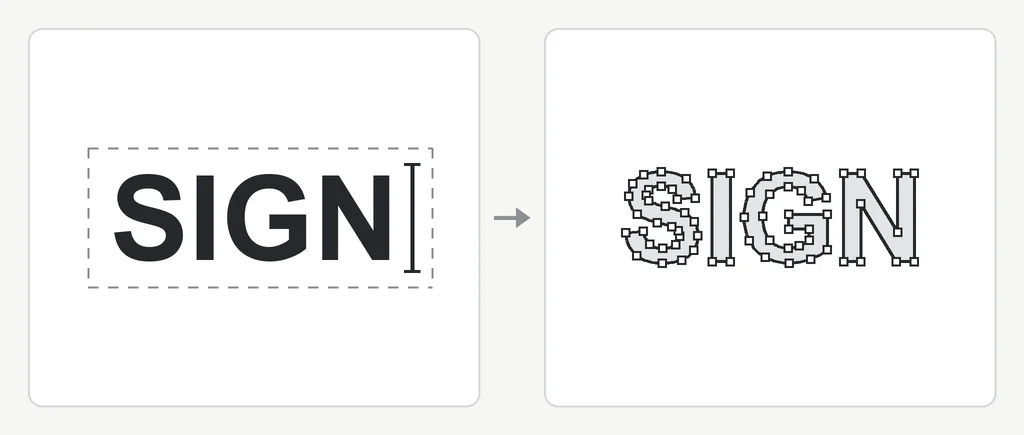
How to convert text to outlines. Outline your fonts — turn the type into shapes before the file leaves you.
Converting text to outlines turns each letter from live type, which needs the font installed to display, into ordinary vector shapes. The next computer, printer RIP or cutter then draws exactly the letterforms you set, with no font file and no substitution. In Illustrator, select the text and choose Type > Create Outlines (Shift+Cmd+O on Mac, Shift+Ctrl+O on Windows). In Inkscape it is Path > Object to Path; in CorelDRAW and Affinity, Convert to Curves. Save a copy with live type first, because outlined text can no longer be edited as text.

- Save an editable copy
Keep the working file with live type under its own name. Outlining is one-way, so only ever outline a copy.
- Outline every piece of type
Unlock and show all layers, select all the text, and convert it. Expand strokes and effects that should print or cut.
- Check nothing live is left
Export the PDF and open its font list in Acrobat. An empty list means the shop will see exactly what you see.
What converting text to outlines does
Live text in a design file is not artwork yet. It is a string of characters plus an instruction: draw these with this font. Every computer that opens the file has to carry out that instruction with its own copy of the font.
When you convert text to outlines, the program reads the letter shapes out of the font and draws them as ordinary vector paths, the same kind of object as a circle or a rectangle. After that, the file no longer needs the font at all. A printer, a sign shop's plotter software or an embroidery digitizer sees closed shapes with anchor points, like the right side of the image at the top of this page, and reproduces the letters you set, spacing included.
That is why the printer asks for it. A shop receives files from many customers and cannot own every typeface they use. Outlined type takes the font out of the equation, so what you approved on your screen is what goes to the press, the cutter or the stitch file.
What goes wrong when type is left live
- Font substitution. If the shop does not have your font, its software swaps in a default such as Arial or Courier, and the logo arrives in the wrong typeface.
- Reflow. A stand-in font with different spacing makes lines longer or shorter, so text runs out of its box, wraps onto a new line or drops off a panel.
- Missing glyphs at the RIP. The raster image processor that drives a large-format printer may stop on a font it cannot find, or print empty boxes where special characters were.
- The cutter ignores it. Vinyl plotter and router software works on paths. Live text either does not show up or cuts in a stand-in font.
- A different version of the same font. Two copies of a typeface from different years or foundries can differ in spacing and characters, so even a shop that has the font may not match your proof.
Outlining is one item on a longer list for cut work. Strokes, open paths and layer setup matter as much, and the full list is in the vinyl cutting artwork requirements.
How to convert text to outlines in each program
Every vector program does the same thing under a different name. Select the whole text object first, not letters inside it in editing mode, then run the command.
| Program | Menu command | Shortcut |
|---|---|---|
| Adobe Illustrator | Type > Create Outlines | Shift+Cmd+O (Mac), Shift+Ctrl+O (Windows) |
| Inkscape | Path > Object to Path | Shift+Ctrl+C |
| CorelDRAW | Object > Convert to Curves | Ctrl+Q |
| Affinity Designer | Layer > Convert to Curves | Cmd+Return (Mac), Ctrl+Enter (Windows) |
Create outlines in Illustrator
Select the text with the Selection tool (V) and choose Type > Create Outlines. To catch every text object in the document, first run Object > Unlock All and Object > Show All, then Select > Object > All Text Objects, then Create Outlines. Each line of type becomes a group of letter shapes. Point type, area type and type on a path all convert the same way.
Inkscape, CorelDRAW and Affinity
In Inkscape, Path > Object to Path turns a text object into a group of paths, and Edit > Select All in All Layers catches everything at once. CorelDRAW's Convert to Curves and Affinity's Convert to Curves do the same job and leave each letter as an editable curve. In all three, frame or flowed text converts like any other text.
Keep an editable copy with live type
Outlining is one-way. Once the letters are shapes, you cannot fix a typo, change a phone number or adjust the letter spacing by typing. So never outline your only file. Save the working file with live type, use Save As to make a separate print copy, and outline that one. A name such as logo-outlined.ai or banner-print.pdf makes it obvious which is which.
Undo works until you close the file. After that, changing outlined wording means retyping it in the same font, or redrawing it if the font is gone.
Effects, strokes and other things that stay live
Create Outlines turns the letters into paths, but anything layered on top of the type can stay live. In Illustrator, a stroke added in the Appearance panel, a drop shadow, an offset path or a warp effect all remain instructions that the next program has to interpret, and cutters and RIPs often read them differently or ignore them.
- Object > Expand Appearance turns effects and extra fills or strokes into real shapes.
- Object > Path > Outline Stroke converts a stroke into a filled shape of the same width, which a cutter can follow.
- Object > Expand handles gradients, patterns and symbols that are still live.
- In Inkscape, Path > Stroke to Path does the stroke step. In CorelDRAW it is Object > Convert Outline to Object.
For decals and cut lettering, expanded strokes and overlapping shapes still have to be merged into clean, weedable paths, which is covered in weed-friendly cut paths.
How to check a PDF for live fonts
If you send a PDF, check what is inside before you upload it. In Adobe Acrobat or Acrobat Reader, open File > Properties and choose the Fonts tab. It lists every font the PDF still uses. An empty list means all the type is outlined, or there is no live text at all. A font marked Embedded or Embedded Subset is live text with the font carried inside the file.
Embedded fonts often print correctly, and many print shops accept them. A shop that asks for outlines wants the empty list, because embedded fonts can still be swapped by preflight software or refused by a cutter. If a font you expected to be outlined appears in the list, go back to the source file: something was locked, hidden or missed.
If the PDF is the only file you have, turning it back into editable vector artwork is a separate job, covered in how to convert a PDF to a vector image.
Send the logo. Get the lettering back as clean outlines.
A designer matches or redraws the type by hand and returns AI, EPS, SVG and PDF with every letter outlined, in 24 hours.
Need something custom? Email hello@vectorwiz.com
When the text only exists in a picture of your logo
Outlining needs live type to start from. If all you have is a JPG or PNG of the logo, there is no text in the file, only pixels arranged like letters, and Create Outlines has nothing to work on. Auto-trace will turn those pixels into shapes, but it follows the blur and the stair-stepped edges, so the letters come out lumpy and uneven. To get clean outlined lettering, the type has to be set again in the right font or redrawn.
Identify the font in a logo
Start by asking whoever designed the logo; the typeface is often named in the brand guidelines. If nobody knows, font identification tools compare a cropped image of the lettering against large type libraries. WhatTheFont from MyFonts, the Font Squirrel Matcherator and the visual search in Adobe Fonts all work this way. Crop to one clean line of text, straighten it, and make it as large and sharp as you can. Script, distorted and heavily customized letters give weaker matches.
Treat a match as a candidate, not an answer. Set the logo text in the suggested font at the same size and lay it over the image. Check the letters that differ most between typefaces: the leg of the R, the ends of the C and S, the shape of a and g, and the angle where strokes are cut off. Logos often use a known font with adjusted spacing, one or two modified letters, or a weight between the ones you can install.
Custom lettering gets redrawn
Many logos are not set in any font. Hand lettering, a modified wordmark, or letters that interlock or share strokes will not match anything in a library. That lettering is redrawn as vector shapes, letter by letter, with the image as the reference, and the result is outlined from the start. This is the kind of work VectorWiz does by hand: a designer rebuilds the lettering as clean paths, and the file comes back with every letter already outlined.
Fonts, licenses and outlined type
Outlined lettering in a finished logo is artwork: shapes, not a font file, and the shop that prints it does not need the font. Live type is different. To open the file and keep editing the text, you need the font installed and licensed on your own computer, and sending live type to someone else assumes they have a license too. That is one more reason shops ask for outlines.
Font licenses vary. Many desktop licenses allow use in a logo, but some restrict commercial use, merchandise or the number of computers, so read the license that came with the font before you build a brand on it. VectorWiz does not sell or license fonts. When we set your logo in a matched typeface, the outlined artwork is yours; to edit it as live text later, you need your own license for that font.
Before you send the file
- Save the live-type master under its own name and outline a copy.
- Unlock and show every layer, then select all the text and outline it.
- Expand appearances and outline any strokes that should print or cut.
- Export the PDF and confirm the Fonts tab in Acrobat lists nothing.
- Send the outlined file and keep the master for the next change.
If you are not sure which format the shop wants for the outlined file, the vector file formats guide covers AI, EPS, SVG, PDF and DXF and who uses each.
Frequently asked questions
Can I edit text after converting it to outlines?
Not as text. The letters become shapes, so you can move, reshape or recolor them, but you cannot retype a word or switch the font. That is why you keep a master file with live type and only outline a copy for print.
Does converting text to outlines change how it looks?
No. The outlines are drawn from the same letter shapes the font holds, with the same spacing, so the printed result matches what you approved. On screen, outlined type can look slightly heavier at small sizes because the font's hinting no longer applies. That is a display difference only.
Why does the printer want outlines if my PDF embeds the fonts?
Embedded fonts often print fine, but they are still live text that preflight software, a RIP or a cutter has to interpret. Some workflows replace or refuse them, and cutting software ignores them. Outlines leave nothing to interpret, so the shop gets the same result on any machine.
How do I find out which font is in my logo?
Ask the designer first, or check the brand guidelines. Otherwise, crop one clean line of the lettering and run it through a font identification tool such as WhatTheFont, the Font Squirrel Matcherator or Adobe Fonts visual search, then compare the suggestion letter by letter. Custom or modified lettering will not match any font and has to be redrawn.
Do I need a font license once the text is outlined?
The outlined shapes in a finished logo are artwork, and the shop printing them does not need the font. To edit the wording as live text, you need the font installed and licensed on your own computer. Font licenses differ on logo and commercial use, so read the one that came with yours. VectorWiz does not sell or license fonts.
Can VectorWiz outline the text in my logo?
Yes. If you only have an image of the logo, a designer sets the lettering in the matching font or redraws it by hand, and every letter comes back outlined in AI, EPS, SVG and PDF. Pricing is by complexity from $19, in 24 hours standard. To edit it as live type later, you need your own license for that font.
Naimur Rahman
Leads design direction and quality at VectorWiz. Reviews and redraws production artwork by hand across sign, wrap, screen-print, and CNC work.
Related articles
Drawn by hand. Built for production.
Instant pricing, no commitment. Production-correct vectors in your inbox in 24.